SIM Swap Scams: How They Work, Warning Signs and What to Do
On this page
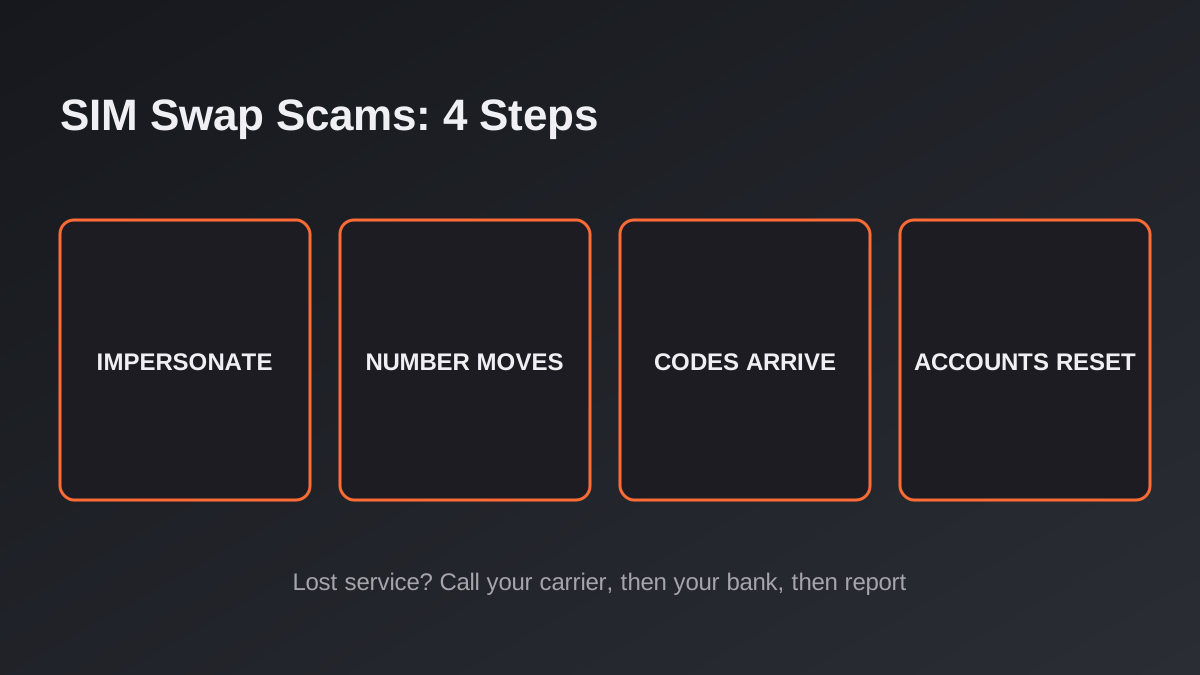
The short answer: a SIM swap (or port-out) scam is when a criminal persuades your mobile carrier to move your phone number to a SIM or device they control. Once they have your number, they receive your calls and texts, including the one-time codes banks and email providers send, and can try to reset your passwords. The first sign is usually that your phone suddenly loses service. If that happens, call your carrier from another phone, then your bank, and report it to the FTC, the FBI's IC3 and your carrier.
The topic is back in the news because of how much contact data now leaks through third parties. In late October 2026, Coinbase said that an incident at its analytics vendor Amplitude exposed contact information for a "small subset" of customers, while saying its own systems were not accessed and customer funds were safe, as CoinDesk reported on 28 October. Coinbase did not say how many people were affected or which fields were involved. The practical point is the one CoinDesk made: exposed email addresses and phone numbers do not drain an account on their own, but they are raw material for phishing and social engineering, which is how SIM swap attempts start.
This is a general awareness guide based on the official sources listed at the end. It is not legal or financial advice.
What a SIM swap actually is
A SIM card (or an eSIM profile) is what ties your phone to your number. A "swap" moves that number to a different SIM or device. The FBI's Internet Crime Complaint Center (IC3) describes it as a technique where criminals target mobile carriers to gain access to bank accounts, virtual currency accounts and other sensitive information.
The FBI says criminals mainly use three routes:
- Social engineering: impersonating you to the carrier and asking it to switch your number to a SIM the criminal holds.
- Insider threat: paying a carrier employee to make the switch.
- Phishing: tricking carrier staff into installing malware that lets criminals carry out swaps themselves.
Once the number moves, your calls and texts go to the criminal's device. They can then trigger "Forgot password" or "Account recovery" requests; if the account relies on a text-message code, the code arrives on their phone, not yours.
SIM swap vs port-out scam: what is the difference?
You will see both terms. The Federal Communications Commission (FCC) treats them as two ways to the same result. In a SIM swap, the scammer gets your number onto a SIM they control, either by tricking the carrier or, occasionally, by physically stealing your SIM. In a port-out scam, they pretend to be you and ask your carrier to "port" your number to a different provider or account, the same process used when a customer legitimately switches carriers. Either way, the FCC says, the scammer can take over your private texts and calls and then try to reset the credentials for your financial and social media accounts.
The FCC notes that eSIMs, which are built into most newer phones and cannot be pulled out, remove some of the risk of a physical SIM being stolen, but that port-out scams remain a security concern.
How big is the problem?
The most recent hard numbers from US law enforcement that we could verify are older, so treat them as a floor, not a current total. The FBI reported that IC3 received 320 SIM-swapping complaints between January 2018 and December 2020, with adjusted losses of about $12 million, and then 1,611 complaints in 2021 alone, with adjusted losses of more than $68 million. Those figures only cover what victims reported to IC3, and they come from a 2022 announcement. We have not found newer official totals, so we do not quote any.
Warning signs
- Your phone suddenly has no service, or shows "SOS only" or "emergency calls only", with no outage in your area. The FCC calls loss of service the typical first sign of a port-out scam.
- A message from your carrier you did not expect: a SIM was activated, a number was ported, an account PIN or password was changed.
- Password-reset or login codes you did not request, or alerts from your bank or email provider about changes you did not make.
- You are locked out of accounts that use your phone number for verification.
- Calls or texts asking for your carrier PIN, account password or personal details, which can be an attempt to gather what is needed to impersonate you.
Speed matters. The FCC describes the attack as a race: the scammer tries to reset as many accounts as possible before the victim realises their phone has gone dark.
What to do in the first hour if you suspect a SIM swap
- Contact your mobile carrier right away from another phone, a landline or a store, and tell them you did not authorise a SIM change or port-out. Ask them to restore your number and to lock the account against further changes.
- Call your bank and other financial institutions. The FBI advises asking them to place an alert on your accounts for suspicious logins or transactions.
- Change passwords for email, financial and social accounts, starting with your main email, from a device you trust. After you regain your number, change your account passwords, as the FTC advises.
- Check for damage: unauthorised charges, new accounts or changed settings. If scammers may have your Social Security number or bank details, the FTC's IdentityTheft.gov lists the steps for your situation.
- Consider a fraud alert on your credit reports; the FCC suggests this after a port-out scam. Contacting one bureau is enough, as it shares the alert with the other two.
- File reports (see below). Keep a note of times, numbers and who you spoke to.
How to reduce your risk
- Set a PIN or password on your mobile account. The FTC and FCC both recommend this; ask your carrier how, as the feature name varies by company.
- Move important accounts off text-message codes where you can. The FTC warns that text-message verification may not stop a SIM swap and suggests an authentication app or a security key for accounts with sensitive personal or financial information.
- Keep personal details off public profiles. The FTC and FBI both advise limiting what you share, such as your phone number, address and date of birth, and not advertising crypto or other financial holdings on social media.
- Never give your carrier PIN or account password to someone who calls you. The FBI says to verify any such call by dialling your carrier's customer service line yourself.
- Turn on email and text alerts for financial accounts, as the FCC suggests, so you hear about changes quickly.
- Treat unexpected "security" messages with suspicion, especially after a data exposure. Contact the company only through its official app, website or the number on your card. Our guides to deepfake and AI voice scams and crypto investment fraud show how scammers use personal details to build trust.
Where to report
- Your mobile carrier: first, to regain control of your number.
- United States, FTC: ReportFraud.ftc.gov; identity theft at IdentityTheft.gov.
- United States, FBI IC3: ic3.gov, plus your local police or FBI field office.
- United States, FCC: a free complaint at consumercomplaints.fcc.gov, which the FCC invites for port-out scams.
- United Kingdom: tell your bank and carrier, then report to Report Fraud at reportfraud.police.uk or 0300 123 2040 (Police Scotland on 101).
- Canada: your local police and the Canadian Anti-Fraud Centre, 1-888-495-8501.
- Australia: Scamwatch, run by the ACCC.
For a channel-by-channel walkthrough, see How to Report a Scam in the US and UK. If the person affected is 60 or older, our guide to scams targeting older adults lists the National Elder Fraud Hotline.
FAQ
Can a scammer SIM swap me with just my phone number?
Not by itself. They usually need enough personal information to pass the carrier's checks, or they rely on an insider or a mistake. The FCC says scammers collect details from social media, purchased data and breaches. That is why a phone number combined with leaked details is a bigger risk than either alone.
Does an eSIM make me safe?
It helps against stolen physical SIMs, but not fully. The FCC says port-out scams remain a concern, so a carrier PIN and non-SMS authentication still matter.
Is a text-message code still better than nothing?
Yes. It is better than no second factor. But the FTC says text verification may not stop a SIM swap, so for your main email, bank and crypto accounts use an authentication app or security key if the service allows it.
Will I get my money back?
It depends on the bank, the payment type and how fast you act. Contact your bank immediately and ask about disputing or recalling transactions; do not pay anyone who offers to recover funds for a fee.
Sources
- FBI IC3: Criminals Increasing SIM Swap Schemes to Steal Millions of Dollars from US Public (PSA220208, 8 February 2022)
- FTC Consumer Advice: SIM Swap Scams: How to Protect Yourself
- FCC: Cell Phone Fraud (reviewed 23 September 2025) and Port-Out Fraud Targets Your Private Accounts (updated 4 March 2025)
- CoinDesk: Coinbase says user funds are safe after third-party vendor exposes customer contact info (27-28 October 2026)
- UK: Report Fraud; Canada: Canadian Anti-Fraud Centre; Australia: Scamwatch (ACCC) (reporting channels checked 31 October 2026)
This article is general consumer-awareness information, not legal or financial advice. Figures are as reported by the agencies cited; check the official sites above before you act.